

Ingenico Charging Base Placement Ideas for Store Desks

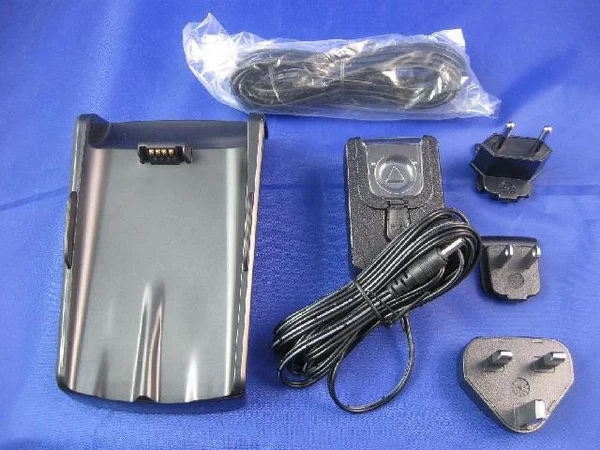
Running a smooth checkout counter depends on more than just fast payment processing. The placement of payment accessories can directly impact customer experience, staff productivity, and device performance. A properly positioned Ingenico Charging Base helps keep payment terminals powered, organized, and easy to access during busy store hours.
Whether you manage a retail shop, café, supermarket, pharmacy, or service desk, smart placement strategies for your Ingenico Charging Base can reduce clutter and improve operational flow. Pairing the setup with a dependable Ingenico Battery and compatible Ingenico Power Supply also helps maintain uninterrupted transactions throughout the day.
In this guide, we will explore practical placement ideas, organization methods, and workspace optimization tips for modern store counters.
Why Ingenico Charging Base Placement Matters
A checkout counter is often the busiest area in any business. Payment terminals are constantly handled by employees and customers, making accessibility and charging efficiency extremely important.
An improperly placed Ingenico Charging Base may create several issues:
- Tangled cables around the counter
- Delayed charging performance
- Reduced workspace for employees
- Increased risk of accidental falls
- Slower customer service during peak hours
By selecting the right location for your Ingenico Charging Base, businesses can create a cleaner and more efficient checkout experience while protecting the device and maintaining a stable power connection.
Place the Charging Base near the Main POS Terminal
One of the most effective placement ideas is positioning the Ingenico Charging Base beside the main POS system. This creates a centralized payment area where employees can easily access both the terminal and charging dock.
Benefits include:
- Faster transaction handling
- Reduced walking movement for staff
- Easier cable organization
- Better device visibility
When combined with a high-quality Ingenico Power Supply, this setup helps ensure stable charging throughout the workday.
For small retail stores with compact counters, placing the charging base directly beside the cash drawer or receipt printer can maximize available workspace.
Keep the Ingenico Charging Base Close to Power Outlets
Power accessibility is a major factor in counter organization. Avoid stretching cables across walking areas or customer-facing spaces.
Instead:
- Position the Ingenico Charging Base within easy reach of a wall outlet
- Use cable organizers to secure wires
- Avoid extension cords where possible
- Keep charging cables away from liquids or heat sources
A properly connected Ingenico Power Supply helps prevent charging interruptions and protects the payment terminal from unstable electrical flow.
Businesses that operate for long hours should also monitor the condition of the Ingenico Battery to ensure reliable performance during continuous usage.
Use Corner Placement for Small Counters
Many stores work with limited counter space. In these situations, corner placement can be highly effective.
Installing the Ingenico Charging Base in the rear corner of the desk offers several advantages:
- Frees up front counter space
- Keeps cables hidden
- Prevents accidental customer contact
- Improves overall desk appearance
This setup works particularly well for boutiques, cafés, convenience stores, and salons where space optimization is important.
Adding a compact cable management tray beneath the counter can further improve organization and create a professional-looking workspace.
Create a Dedicated Charging Zone
Stores that use multiple payment terminals often benefit from a dedicated charging station area.
Instead of placing devices randomly across the counter, designate one section specifically for:
- Ingenico Charging Base units
- Backup Ingenico Battery packs
- Ingenico Power Supply adapters
- Spare payment terminals
This arrangement simplifies device management and helps employees quickly identify which terminals are fully charged.
Dedicated charging zones are especially useful for:
- Restaurants with mobile payment devices
- Retail chains
- Supermarkets
- Large service counters
A structured setup also reduces the risk of misplaced accessories and damaged cables.
Avoid High-Traffic Counter Areas
Busy counters experience constant movement from both employees and customers. Placing the Ingenico Charging Base in a high-traffic area increases the chance of damage.
Avoid placing the charging dock:
- Near the edge of the counter
- Beside customer bags or merchandise
- Close to drink preparation stations
- In areas with frequent hand movement
Instead, select a stable and protected section of the desk where the device remains secure during peak business hours.
This simple adjustment can extend the life of both the Ingenico Charging Base and the Ingenico Battery.
Improve Cable Management for a Cleaner Setup
Messy cables can make even a modern store counter appear disorganized. Proper cable management improves both safety and appearance.
Helpful cable management ideas include:
- Using adhesive cable clips
- Installing under-desk cable trays
- Labeling charging cords
- Bundling excess cable length
When connecting your Ingenico Power Supply, ensure the cable remains untangled and protected from sharp bends.
Clean cable organization also makes it easier for staff to replace or troubleshoot devices when needed.
Consider Customer Interaction Flow
Payment terminals should remain convenient for customers without disrupting checkout speed.
When placing the Ingenico Charging Base, think about:
- Card tap accessibility
- Customer reach distance
- Employee comfort
- Counter visibility
A well-positioned terminal allows customers to complete payments quickly while still keeping the device securely docked between transactions.
Retailers that rely heavily on contactless payments often position the Ingenico Charging Base slightly angled toward the customer for smoother interaction.
Use Elevated Placement for Better Accessibility
Some businesses prefer elevated placement solutions for payment terminals.
Mounting the Ingenico Charging Base on a raised stand or shelf can:
- Improve screen visibility
- Reduce desk clutter
- Enhance customer convenience
- Create a modern checkout appearance
This strategy is commonly used in electronics stores, premium retail spaces, and hospitality counters.
When using elevated placement, always ensure the Ingenico Power Supply cable is securely routed to prevent accidental disconnection.
Maintain Proper Ventilation Around the Charging Base
Electronic accessories require airflow to function efficiently. Avoid placing the Ingenico Charging Base inside enclosed cabinets or tightly packed spaces.
Good ventilation helps:
- Prevent overheating
- Support stable charging
- Protect the Ingenico Battery
- Extend accessory lifespan
Leave enough open space around the dock to allow heat to dissipate naturally during charging cycles.
This is particularly important for businesses operating long hours or handling frequent payment transactions.
Rotate Backup Batteries Efficiently
Many businesses keep spare Ingenico Battery units ready for uninterrupted service. Organizing these batteries near the charging area improves operational efficiency.
A practical approach includes:
- Labeling charged and uncharged batteries
- Using storage trays
- Rotating battery usage evenly
- Keeping spare units near the Ingenico Charging Base
This reduces downtime and helps maintain consistent terminal performance throughout the day.
Placement Tips for Different Business Types
Retail Stores
Position the Ingenico Charging Base beside the barcode scanner or POS monitor for quick employee access.
Cafés and Restaurants
Use side counter placement to protect the device from spills and food preparation areas.
Pharmacies
Keep charging stations organized behind the counter to maintain a clean professional appearance.
Salons and Service Counters
Install compact charging zones to save workspace while keeping payment devices accessible.
Supermarkets
Create multi-device charging stations for staff handling mobile checkout terminals.
Final Thoughts
A well-organized checkout counter improves both employee workflow and customer satisfaction. Proper Ingenico Charging Base placement helps businesses maintain cleaner desks, faster transactions, and safer device handling.
Combining smart placement strategies with a dependable Ingenico Battery and compatible Ingenico Power Supply supports uninterrupted payment operations throughout the day.
Whether you operate a small boutique or a busy retail chain, investing time in optimizing your payment terminal setup can lead to smoother daily operations and a more professional customer experience.