
Virtual Terminal Basics for Faster Business Transactions Now

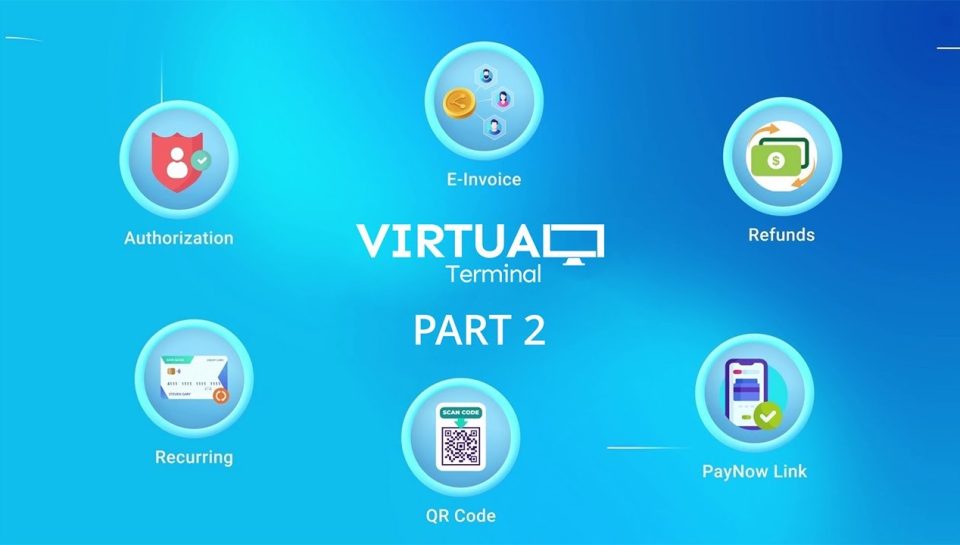
Modern businesses need payment systems that are fast, flexible, and easy to manage. Whether you run a retail store, service company, medical office, or online business, accepting payments quickly can improve customer satisfaction and increase operational efficiency. This is where a Virtual terminal becomes an essential tool.
A Virtual terminal allows businesses to process payments manually through a web-based interface instead of relying only on a physical card terminal. It helps companies accept card payments over the phone, through email orders, or during remote transactions. As digital payments continue to grow, many businesses are turning to Virtual terminals to simplify payment processing and reduce delays.
In this guide, you will learn the basics of a Virtual terminal, how it works, its advantages, security features, and how businesses can use it to accelerate transactions.
What Is a Virtual Terminal?
A Virtual terminal is an online payment application that allows merchants to enter customer card details manually through a computer, tablet, or smartphone. Unlike a traditional card terminal, it does not require customers to physically swipe or tap their cards.
Businesses can access the Virtual terminal through a secure internet browser. Staff members simply log into the system, enter payment details, and process the transaction instantly.
Many businesses use Virtual terminals for:
- Phone payments
- Mail orders
- Remote billing
- Customer service payments
- Subscription services
- Invoice payments
A Virtual terminal functions similarly to a standard card terminal, but it offers more flexibility for businesses that handle remote transactions.
How a Virtual Terminal Works
The payment process inside a Virtual terminal is simple and efficient. Here is a step-by-step overview:
- Customer Shares Payment Details
The customer provides their debit or credit card information over the phone or through a secure communication channel.
- Merchant Logs Into the System
The business accesses the Virtual terminal using a secure dashboard connected to its payment processor.
- Payment Information Is Entered
The merchant manually enters:
- Card number
- Expiry date
- CVV code
- Billing address
- Transaction amount
- Payment Authorization
The payment gateway securely sends the data for approval through banking networks.
- Transaction Completion
Once approved, the payment is processed instantly, and the business receives confirmation.
This workflow allows businesses to complete transactions quickly without needing a physical card terminal in front of the customer.
Benefits of Using a Virtual Terminal
Faster Payment Processing
One of the biggest advantages of a Virtual terminal is speed. Businesses can process payments immediately while speaking with customers, reducing delays and improving cash flow.
Improved Business Flexibility
Unlike a traditional card terminal that requires face-to-face interaction, Virtual terminals support remote transactions from virtually anywhere with internet access.
Better Customer Convenience
Customers can make payments over the phone without visiting a physical location. This convenience improves customer experience and can increase repeat business.
Reduced Hardware Dependency
Businesses may reduce the need for multiple physical card terminal devices. Since the Virtual terminal operates online, companies only need internet-connected devices.
Easy Payment Tracking
Most Virtual terminals provide dashboards with transaction history, reporting tools, and invoice management features. This makes accounting and reconciliation easier.
Support for Multiple Payment Types
Many Virtual terminal systems support:
- Credit cards
- Debit cards
- Recurring payments
- Invoice payments
- Digital receipts
Virtual Terminal vs Card Terminal
Although both systems process card payments, there are important differences between a Virtual terminal and a traditional card terminal.
| Feature | Virtual Terminal | Card Terminal |
| Payment Type | Manual entry | Tap, swipe, insert |
| Location Flexibility | Remote access | Physical presence required |
| Hardware Need | Minimal | Dedicated device |
| Best For | Phone and remote payments | In-store payments |
| Internet Requirement | Browser-based | Device connection |
Businesses often use both systems together for complete payment flexibility.
Industries That Use Virtual Terminals
Many industries rely on Virtual terminals to streamline payment collection.
Healthcare Providers
Medical clinics and hospitals often collect payments over the phone using Virtual terminal systems.
Professional Services
Law firms, consultants, and accounting companies use Virtual terminals to bill clients remotely.
Hospitality Businesses
Hotels and travel agencies commonly process reservation payments through a Virtual terminal.
E-commerce Support Teams
Online businesses use Virtual terminals for customer support transactions and manual order processing.
Home Service Companies
Repair services, maintenance providers, and contractors can accept payments without carrying physical card terminal devices everywhere.
Security Features of Virtual Terminals
Security is one of the most important factors in digital payment processing. Modern Virtual terminals include several protection measures.
Data Encryption
Payment information is encrypted during transmission to reduce the risk of unauthorized access.
PCI Compliance
Most reputable Virtual terminal providers follow PCI DSS standards to protect cardholder data.
User Authentication
Businesses can control employee access through usernames, passwords, and multi-factor authentication.
Fraud Detection Tools
Some Virtual terminals include fraud screening systems that identify suspicious transactions automatically.
Secure Payment Gateways
Transactions pass through secure payment gateways that help maintain payment integrity.
Businesses should always train employees to handle customer card data responsibly and follow payment security guidelines.
How to Choose the Right Virtual Terminal
Selecting the right Virtual terminal depends on business needs and transaction volume.
Evaluate Processing Fees
Compare transaction fees, monthly charges, and hidden costs before choosing a provider.
Check Integration Options
Some Virtual terminals integrate with:
- Accounting software
- CRM systems
- E-commerce platforms
- Billing tools
Review Security Standards
Ensure the provider supports PCI compliance and advanced fraud protection.
Consider Ease of Use
A user-friendly dashboard can reduce training time and improve staff productivity.
Customer Support Availability
Reliable technical support is important when handling payment systems.
Tips for Faster Business Transactions
Businesses can improve transaction speed and efficiency by following these practices:
Use Stable Internet Connections
A reliable connection helps the Virtual terminal process payments without interruption.
Train Employees Properly
Staff should understand how to enter payment details accurately and securely.
Automate Recurring Billing
Many Virtual terminals support recurring payments for subscriptions and repeat customers.
Maintain Updated Software
Regular updates help improve security and performance.
Monitor Transaction Reports
Review reports frequently to identify payment trends and improve financial management.
Common Challenges Businesses Face
While Virtual terminals offer many benefits, businesses should also understand potential challenges.
Manual Entry Errors
Incorrect card information can cause payment failures. Employee training helps reduce mistakes.
Chargeback Risks
Phone payments sometimes carry higher chargeback risks compared to chip-based card terminal transactions.
Internet Dependency
Since the system operates online, stable internet access is necessary.
Compliance Responsibilities
Businesses must still follow payment security rules even when using third-party providers.
Despite these challenges, many businesses find that the advantages of Virtual terminals outweigh the limitations.
Future of Virtual Terminals
The future of payment processing continues to evolve rapidly. Modern Virtual terminals now include advanced features such as:
- Cloud-based reporting
- Mobile accessibility
- AI-powered fraud monitoring
- Automated invoicing
- CRM integration
As remote business operations increase globally, Virtual terminals are becoming more valuable for companies seeking flexible payment solutions.
Businesses that adopt digital payment technologies early may improve customer service, streamline operations, and stay competitive in changing markets.
Conclusion
A Virtual terminal is a practical and flexible payment solution for businesses that process remote or manual card payments. It allows merchants to accept payments quickly without depending entirely on a physical card terminal. From healthcare providers to online businesses, many industries now rely on Virtual terminals to improve transaction speed and customer convenience.
By understanding how a Virtual terminal works, businesses can reduce payment delays, improve operational efficiency, and provide smoother customer experiences. As digital payments continue to grow, Virtual terminals will remain an important tool for faster and more secure business transactions.